WSL to Native Linux: Why I Ditched the Subsystem for i3 and a Real Environment
How I graduated from WSL on Windows to native Linux with i3, Alacritty, Rofi, and learned what a real Unix environment feels like.
WSL was supposed to be the best of both worlds. Windows on top, Linux underneath. What I found was the worst of both: Windows slowing everything down, and Linux just far enough away that you couldn't actually control it.
I spent two years in WSL thinking that's what Unix development felt like. The moment I switched to native Linux with i3, I realized I'd been working with my hands tied. Not with my hands tied to Windows—with my hands tied through a compatibility layer that was always one step behind reality.
Why i3
i3 is a tiling window manager. That means no overlapping windows, no mouse-driven layouts, no "where did I put that terminal?" moments. Every window occupies space efficiently. Every action is keyboard-driven.
For someone coming from Windows, the learning curve feels steep. But here's what flipped: once you stop thinking about where windows are and start thinking about what is on screen, everything else is noise.
The Stack
I settled on:
- i3: Tiling window manager
- Alacritty: GPU-accelerated terminal emulator (way faster than the Windows Terminal ever was)
- Rofi: Application launcher and window switcher (replaces the Windows Start menu, but actually useful)
- Fish shell: Faster command-line experience with smarter completions
- Polybar: Status bar that lives at the top, shows what I actually care about
- Picom: Compositor for shadows and transparency (optional but makes i3 less austere)
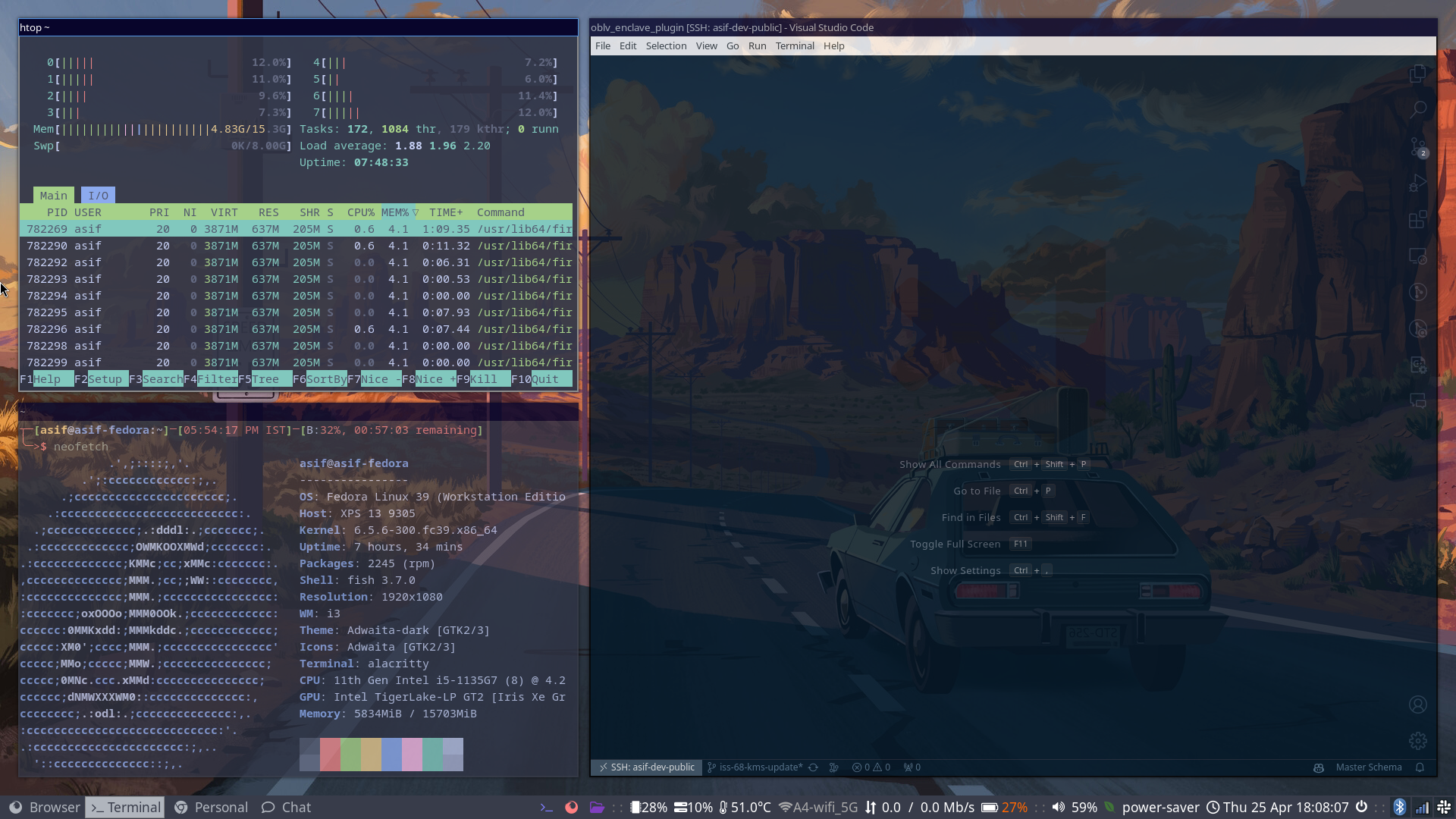
The key insight: these tools work together. i3 sends keyboard input to Alacritty, Rofi pops up over everything, and the status bar gives me the information I need without stealing focus.
The Ricing Phase
"Ricing" in Linux means customizing and beautifying your desktop. For me, it meant:
-
Color scheme: I grabbed a consistent palette and applied it everywhere—i3 theme, Alacritty, Rofi, Polybar, even the terminal prompt. Consistency makes it feel intentional instead of chaotic.
-
Keybindings: I remapped everything.
Super+J/K/L/;to move focus between windows.Super+Shift+J/K/L/;to move windows.Super+Dfor Rofi. Muscle memory kicked in within a week. -
Workspace layout: i3 lets you organize your workspaces per app family—one for terminals and shells, one for browsers, one for IDE. Switch workspaces with
Super+Number. Contexts stay separate. -
Scripts: Small shell scripts glue it all together. One for starting the day (opens terminal, browser, email). One for quick system diagnostics. One for taking screenshots and uploading them.
The Transition
The first day was slow. The first week was learning keybindings. By week two, I realized I was faster than I ever was with Windows.
No floating menus. No system trays full of icons I don't need. No searching for settings buried three levels deep. Everything I need is a keystroke away, and everything else is invisible.
Why WSL Wasn't Enough
WSL is great if you need Linux tooling on Windows. But it's a trap:
-
You still have Windows. Everything still goes through the Windows scheduler. File access is slow because it's crossing the hypervisor. Keyboard input has latency because Windows is still involved.
-
You can't customize the environment. WSL is a sandboxed Linux instance. You can't pick your window manager, your display server, your kernel parameters. It's Linux in a box.
-
You're always context-switching. Your editor runs on Windows (with Windows latency). Your build runs in WSL (with WSL latency). Your browser is on Windows. Your terminal is on Windows, but it's running shell code in WSL. The cognitive overhead never stops.
-
Filesystem crossing is slow. If your Windows editor accesses files in WSL, every read goes through a translation layer. WSL2 improved this, but it's still not native.
I used WSL to learn Linux commands while keeping Windows as a safety net. But the safety net became an anchor.
The Native Switch
Native Linux with i3 removed all those compromises. No hypervisor. No Windows scheduler. No context-switching between environments. Just the OS, the tools, and the work.
What I Gained
- Speed: No hypervisor overhead, no Windows scheduler interference. Everything runs as fast as the hardware allows.
- Control: I own the entire environment, from kernel parameters to window manager to every pixel on screen
- Keyboard navigation: Every app, every OS function is reachable without touching the mouse
- Clarity: Once you know your keybindings, you work without looking
- Focus: The desktop gets out of my way, so the actual work stays in focus
Trade-offs
- Hardware support: Some Bluetooth devices needed drivers I had to hunt down
- Polish: Some apps still feel raw compared to their Windows equivalents
- Gaming: Windows + WSL still wins here
- One-click installers: Linux requires thinking about what you're running
But for development, infrastructure work, and systems thinking? Native Linux + i3 is objectively better.
The trap of WSL was that it promised the best of both worlds. What it delivered was the limitations of both worlds, stacked. Once I went native, I realized I'd spent two years with my hands tied behind my back—all in the name of not wanting to fully commit to Linux.
Setup screenshots and dotfiles live in my dotfiles repo.